
14. Introduction to Dask DataFrame#
You can access this notebook on this GitHub repo.
Dask DataFrames coordinate many pandas DataFrames/Series arranged along the index. A Dask DataFrame is partitioned row-wise, grouping rows by index value for efficiency.
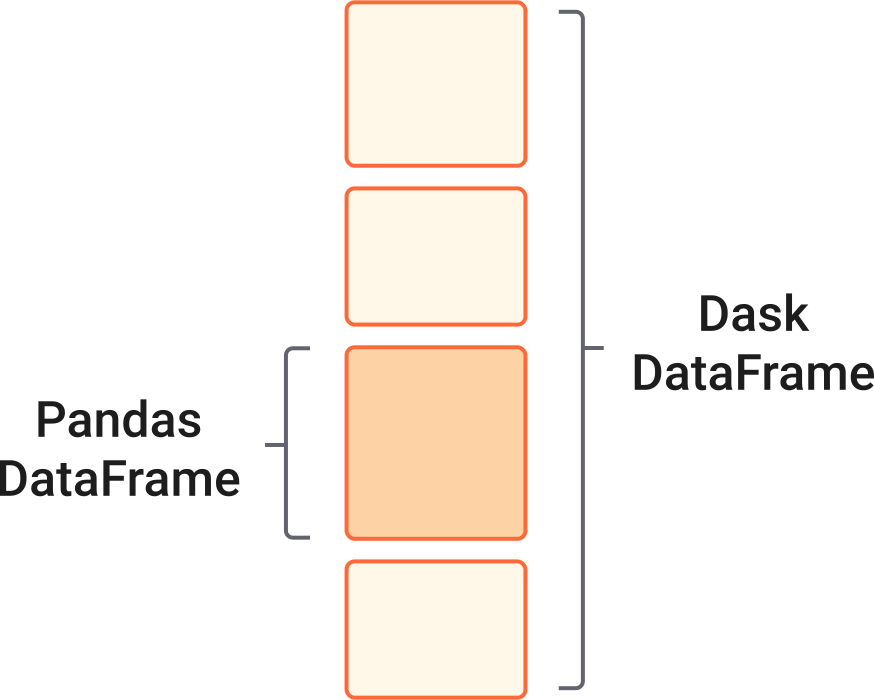
Many of existing methods from pandas API are available in Dask DataFrame. Checkout this section of the documentation to learn more about these. In general, computations that are parallelizable are implemented in Dask DataFrame.
In this lecture, you will learn to use Dask DataFrame to analyze large tabular climate data.
14.1. Analyzing Multiple Large CSV files using Dask Data Frame#
For this tutorial, we will use the NOAA Global Historical Climatology Network Daily (GHCN-D) data available on AWS S3. You can read more about the data on Registry of Open Data on AWS here.
More information about the dataset, including the metadata descriptions, is available on NOAA’s website.
GHCN-D contains daily observations over global land areas. It contains station-based measurements from land-based stations worldwide, about two thirds of which are for precipitation measurement only. Some data are more than 175 years old.
This dataset is very large and to analyze it within Python you need to use Dask Dataframe.
14.1.1. Download Data from AWS S3 bucket#
You can download the dataset from AWS S3 bucket using the following commands. This dataset does not require an AWS account (hence the UNSIGNED value should be passed to the S3 client).
import boto3
import os
from botocore import UNSIGNED
from botocore.client import Config

def download_s3_objects_no_auth(bucket_name, download_path, prefix, substring, aws_region = None):
    """
    Download all objects from a public S3 bucket (no authentication) that contain a specific prefix and substring in their keys.

    Parameters
    ----------
    bucket_name : str
        The name of the S3 bucket.
    download_path : str
        Local directory where the files will be downloaded.
    prefix : str
        Characters that are required to be at the begining of the S3 object keys.
    substring : str
        The substring to search for in the S3 object keys.
    aws_region : str
        AWS region where the S3 bucket is located (optional).

    Returns
    -------
    Donwloads all the files that match the search criteria into the download_path

    """
    # Initialize the S3 client with no request signing (public bucket)
    s3_client = boto3.client('s3', config = Config(signature_version=UNSIGNED), region_name = aws_region)

    # Ensure the download path exists
    if not os.path.exists(download_path):
        os.makedirs(download_path)

    # List all objects in the bucket that contain the prefix
    response = s3_client.list_objects_v2(Bucket = bucket_name, Prefix = prefix)
    if 'Contents' not in response:
        print(f"No objects found in the bucket '{bucket_name}'.")
        return

    # Loop through objects and download those that contain the substring
    for obj in response['Contents']:
        key = obj['Key']
        if substring in key:
            local_filename = os.path.join(download_path, key.split('/')[-1])
            if not os.path.exists(local_filename):
                print(f"Downloading {key} to {local_filename}...")
                s3_client.download_file(bucket_name, key, local_filename)
                print(f"Downloaded: {local_filename}")
            else:
                print(f"Object {key} exists at {local_filename}. Download skipped.")
download_s3_objects_no_auth(bucket_name="noaa-ghcn-pds", download_path="../data/", prefix="csv/by_year/", substring="202")
Object csv/by_year/2020.csv exists at ../data/2020.csv. Download skipped.
Object csv/by_year/2021.csv exists at ../data/2021.csv. Download skipped.
Object csv/by_year/2022.csv exists at ../data/2022.csv. Download skipped.
Object csv/by_year/2023.csv exists at ../data/2023.csv. Download skipped.
Object csv/by_year/2024.csv exists at ../data/2024.csv. Download skipped.
Object csv/by_year/2025.csv exists at ../data/2025.csv. Download skipped.
Object csv/by_year/2026.csv exists at ../data/2026.csv. Download skipped.
14.1.2. Import Packages#
import dask.dataframe as dd
from dask.distributed import Client, LocalCluster
dask_cluster = LocalCluster()
dask_client = Client(dask_cluster)
print(dask_client.dashboard_link)
http://127.0.0.1:8787/status
2026-10-08 13:59:03,822 - distributed.shuffle._scheduler_plugin - WARNING - Shuffle 068130108d9c2dac359fa0c0e03c5ddd initialized by task ('shuffle-transfer-068130108d9c2dac359fa0c0e03c5ddd', 164) executed on worker tcp://127.0.0.1:52466
2026-10-08 13:59:24,040 - distributed.shuffle._scheduler_plugin - WARNING - Shuffle 068130108d9c2dac359fa0c0e03c5ddd deactivated due to stimulus 'task-finished-1791482364.038096'
2026-10-08 13:59:24,960 - distributed.shuffle._scheduler_plugin - WARNING - Shuffle 1c4851202ab6b165e584641a136a79a5 initialized by task ('shuffle-transfer-1c4851202ab6b165e584641a136a79a5', 111) executed on worker tcp://127.0.0.1:52460
2026-10-08 13:59:45,774 - distributed.shuffle._scheduler_plugin - WARNING - Shuffle 1c4851202ab6b165e584641a136a79a5 deactivated due to stimulus 'task-finished-1791482385.7732701'
14.1.3. Read One CSV file#
Let’s first load one CSV file and see how Dask Dataframe works.
noaa_df = dd.read_csv("../data/2023.csv", dtype = {"Q_FLAG" : "string"})
Dask infers dtypes from a sample at the start of the first block, and Q_FLAG is almost always empty there, so it guesses float and fails later. So we need to define its type.
Now, you can check the number of partitions that Dask by default selects.
noaa_df.npartitions
21
To change the number of partitions you need to define the blocksize in the read_csv function:
noaa_df = dd.read_csv("../data/2023.csv", dtype = {"Q_FLAG" : "string"}, blocksize=25e6)
noaa_df.npartitions
54
The following line is an unnecessary step and you should not run it regularly. This will try to load all the data into memory which can easily go beyond your memory limit.
# DO NOT RUN
# noaa_df.compute()
But if you would like to load a small portion of the data, you can load a few lines of the dataframe as following (or maybe not?):
noaa_df.loc[:100, :].compute()
| ID | DATE | ELEMENT | DATA_VALUE | M_FLAG | Q_FLAG | S_FLAG | OBS_TIME | |
|---|---|---|---|---|---|---|---|---|
| 0 | AGM00060430 | 20230101 | TMIN | 101 | <NA> | <NA> | S | NaN |
| 1 | AGM00060430 | 20230101 | PRCP | 0 | <NA> | <NA> | S | NaN |
| 2 | AGM00060430 | 20230101 | TAVG | 148 | H | <NA> | S | NaN |
| 3 | AGM00060437 | 20230101 | TMIN | 87 | <NA> | <NA> | S | NaN |
| 4 | AGM00060437 | 20230101 | PRCP | 0 | <NA> | <NA> | S | NaN |
| ... | ... | ... | ... | ... | ... | ... | ... | ... |
| 96 | US1MDAA0063 | 20231224 | SNWD | 0 | <NA> | <NA> | N | 730.0 |
| 97 | US1MDAA0065 | 20231224 | PRCP | 5 | <NA> | <NA> | N | 645.0 |
| 98 | US1MDAA0065 | 20231224 | SNOW | 0 | <NA> | <NA> | N | 645.0 |
| 99 | US1MDAA0065 | 20231224 | SNWD | 0 | <NA> | <NA> | N | 645.0 |
| 100 | US1MDAA0065 | 20231224 | WESD | 0 | <NA> | <NA> | N | 645.0 |
5454 rows × 8 columns
Why do you think the printed df has 5454 rows? and Why is the output different from noaa_df.head(100)?
noaa_df.head(100)
| ID | DATE | ELEMENT | DATA_VALUE | M_FLAG | Q_FLAG | S_FLAG | OBS_TIME | |
|---|---|---|---|---|---|---|---|---|
| 0 | AGM00060430 | 20230101 | TMIN | 101 | <NA> | <NA> | S | NaN |
| 1 | AGM00060430 | 20230101 | PRCP | 0 | <NA> | <NA> | S | NaN |
| 2 | AGM00060430 | 20230101 | TAVG | 148 | H | <NA> | S | NaN |
| 3 | AGM00060437 | 20230101 | TMIN | 87 | <NA> | <NA> | S | NaN |
| 4 | AGM00060437 | 20230101 | PRCP | 0 | <NA> | <NA> | S | NaN |
| ... | ... | ... | ... | ... | ... | ... | ... | ... |
| 95 | AM000037801 | 20230101 | PRCP | 0 | <NA> | <NA> | S | NaN |
| 96 | AM000037801 | 20230101 | TAVG | -74 | H | <NA> | S | NaN |
| 97 | AM000037815 | 20230101 | TMIN | -130 | <NA> | <NA> | S | NaN |
| 98 | AM000037815 | 20230101 | PRCP | 0 | <NA> | <NA> | S | NaN |
| 99 | AM000037815 | 20230101 | TAVG | -46 | H | <NA> | S | NaN |
100 rows × 8 columns
Note: Dask does not store the outputs of the df.compute() back in df. If you need to keep these values, you should instead run df = df.compute().
14.1.4. Read Multiple CSVs#
Here, we will define a new df and load multiple CSV files.
noaa_large_df = dd.read_csv("../data/*.csv", dtype = {"Q_FLAG" : "object"}, blocksize=25e6)
noaa_large_df.npartitions
339
noaa_large_df
| ID | DATE | ELEMENT | DATA_VALUE | M_FLAG | Q_FLAG | S_FLAG | OBS_TIME | |
|---|---|---|---|---|---|---|---|---|
| npartitions=339 | ||||||||
| string | int64 | string | int64 | string | string | string | float64 | |
| ... | ... | ... | ... | ... | ... | ... | ... | |
| ... | ... | ... | ... | ... | ... | ... | ... | ... |
| ... | ... | ... | ... | ... | ... | ... | ... | |
| ... | ... | ... | ... | ... | ... | ... | ... |
Let’s calculate the mean of each type of observation in whole dataset.
noaa_mean_values = noaa_large_df.groupby("ELEMENT")["DATA_VALUE"].mean()
noaa_mean_values
Dask Series Structure:
npartitions=1
    float64
        ...
Dask Name: getitem, 5 expressions
Expr=((ArrowStringConversion(frame=FromMapProjectable(a6f3966))[['ELEMENT', 'DATA_VALUE']]).mean(observed=False, chunk_kwargs={'numeric_only': False}, aggregate_kwargs={'numeric_only': False}, _slice='DATA_VALUE'))['DATA_VALUE']
noaa_mean_values.compute()
ELEMENT
ADPT     65.022814
WSF5    113.099698
WT06      1.000000
WT11      1.000000
PSUN     42.333863
           ...
SX53    101.540827
SN33    118.878549
MDTN    110.021534
SX56     60.741944
THIC    308.350369
Name: DATA_VALUE, Length: 75, dtype: float64
Next, we will select a station in Worcester, MA and calculate the mean for each observation. You can see the list of all stations on NOAA’s website here.
worcester_df = noaa_large_df[noaa_large_df["ID"].isin(["US1MAWR0097"])]
worcester_mean = worcester_df.groupby("ELEMENT")["DATA_VALUE"].mean()
worcester_mean
Dask Series Structure:
npartitions=1
    float64
        ...
Dask Name: getitem, 9 expressions
Expr=(((Filter(frame=ArrowStringConversion(frame=FromMapProjectable(a6f3966)), predicate=Isin(frame=ArrowStringConversion(frame=FromMapProjectable(a6f3966))['ID'], values=_DelayedExpr(Delayed('delayed-e7391bf8c6490bf0d04ca0ef7cf0005d')))))[['ELEMENT', 'DATA_VALUE']]).mean(observed=False, chunk_kwargs={'numeric_only': False}, aggregate_kwargs={'numeric_only': False}, _slice='DATA_VALUE'))['DATA_VALUE']
Now, we want to calculate the mean but we are interested to keep these values in memory. So we will assign the output to a new variable worcester_mean_values:
%%time
worcester_mean_values = worcester_mean.compute()
CPU times: user 5.55 s, sys: 1.31 s, total: 6.86 s
Wall time: 21.6 s
worcester_mean_values
ELEMENT
WESF      0.000000
SNWD    158.750000
PRCP     53.095327
WESD      0.000000
SNOW      2.433884
Name: DATA_VALUE, dtype: float64
We might have used the wrong number of partitions though. worcester_df is a small subset of the original noaa_large_df but it has the same number of partitions:
worcester_df.npartitions
339
Let’s re-partition it, and use persist() to keep the data in memory.
worcester_df = worcester_df.repartition(npartitions=1).persist()
%%time
worcester_df.groupby("ELEMENT")["DATA_VALUE"].mean().compute()
CPU times: user 2.41 s, sys: 648 ms, total: 3.05 s
Wall time: 18.5 s
ELEMENT
PRCP     53.095327
SNOW      2.433884
SNWD    158.750000
WESD      0.000000
WESF      0.000000
Name: DATA_VALUE, dtype: float64
%%time
worcester_df.groupby("ELEMENT")["DATA_VALUE"].mean().compute()
CPU times: user 28.2 ms, sys: 21.9 ms, total: 50.1 ms
Wall time: 71.3 ms
ELEMENT
PRCP     53.095327
SNOW      2.433884
SNWD    158.750000
WESD      0.000000
WESF      0.000000
Name: DATA_VALUE, dtype: float64
Compare the time it took to run the mean for the second time to the first time.
14.1.5. Task: find the station with the highest number of snow days#
Write a function that receives the name of an observation (e.g. PRCP) from the NOAA GHCN-D dataset, and returns the ID of the station(s) with the highest number of days that the target observation has been more than 0.
Use this function to find the station that has the highest number of snow days across years 2020-2026: